Webster

The Constitution was made to guard the people against the dangers of good intentions." --American Statesman Daniel Webster (1782-1852)


Showing posts with label tech stuff. Show all posts

Thursday, March 5, 2026

New App warns if "Smart Glasses" are in use around you.


I saw this from "Tech Crunch" I think it is a really good idea, I don't like the idea of someone surreptitiously recording me.  Yeah I know in this day and age, I know cameras' are everywhere, but "Smart Glasses" are personal.   


This is the screenshot from my phone, I went ahead and downloaded it.


One of the chief problems with “luxury surveillance” devices, like smart glasses with baked-in video recording cameras, is that they often look indistinguishable from regular eyewear, meaning you might be recorded without knowing it.

But now there is an app that can detect and alert you when someone nearby is wearing smart glasses, or potentially other always-recording tech.

The Android app, aptly named Nearby Glasses, constantly scans for nearby signals that emit from Bluetooth-enabled tech, such as wearable devices made by Meta (and Oakley) and Snap.

The app launches at a time as there is an increasing resistance against always-recording or listening devices, which critics say process information about nearby people who do not give their consent. 

Yves Jeanrenaud, who made the app, first spoke to 404 Media about the project and said he was in part inspired to make Nearby Glasses after reading the independent publication’s reporting into wearable surveillance devices, including how Meta’s Ray-Ban smart glasses have been used in immigration raids and to film and harass sex workers.

On the app’s project page, Jeanrenaud described smart glasses as an “intolerable intrusion, consent neglecting, horrible piece of tech.”

Jeanrenaud told TechCrunch in an email that his motivation came from “witnessing the sheer scale and inhumane nature of the abuse these smart glasses are involved in.” Jeanrenaud also cited Meta’s decision to implement face recognition as a default feature in its smart glasses, “which I consider to be a huge floodgate pushed open for all kinds of privacy-invasive behaviour.”

The app works by listening for nearby Bluetooth signals that contain a publicly assigned identifier unique to the Bluetooth device’s manufacturer. If the app detects a Bluetooth signal from a nearby hardware device made by Meta or Snap, the app will send the user an alert. (The app also allows users to add their own specific Bluetooth identifiers, allowing the user to detect a broader range of wearable surveillance gadgetry.)

side-by-side screenshots showing the Nearby Glasses app working, with a phone notification alerting the user that there's a nearby glasses wearer.
ScreenshotImage Credits:Yves Jeanrenaud

Jeanrenaud said that the app may be prone to false positives. This means the app may detect a nearby virtual reality headset made by Meta and alert the user thinking it is a pair of smart glasses made from the same device maker. That said, virtual reality headsets are usually larger and more obvious to someone that they’re wearing the device.

To try this out, I loaded the app on an Android phone and walked around my city’s neighborhood, and found (to my surprise) no smart glasses wearers, and did not receive an alert.

But since the app allows it, I added a specific Bluetooth identifier (0x004C), which allowed me to search for nearby devices made by Apple — and my test device immediately flooded with alerts (as you might expect), likely picking up every Apple-made device in my near proximity. 

This showed that the app works as designed.

Jeanrenaud is still adding new features, and said that there is demand for an iPhone app, but that it depends on spare time and availability.

Speaking of the app, Jeanrenaud said: “Of course, it’s a technical solution to a social problem (which is amplified by technology), and it won’t go away anytime soon,” and described the app as a “desperate act of resistance, hoping it would help at least someone.”

Spokespeople for Meta and Snap did not respond to TechCrunch’s requests for comment.

Friday, August 8, 2014

Blast from the Past...Techie stuff

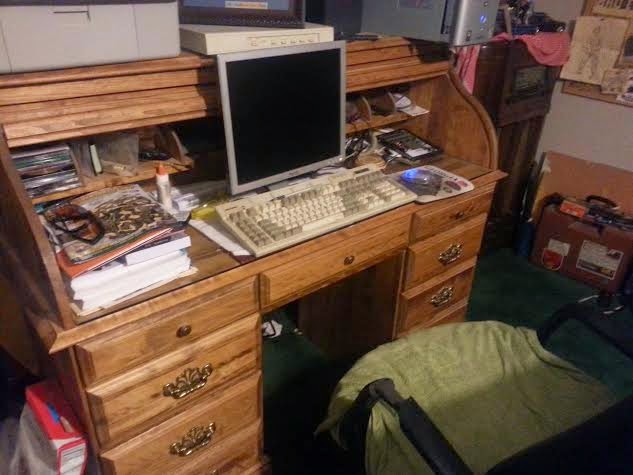
   I used computers when I was in the service, but to call it a computer was interesting, if I recall, it was a 100 KB disc suspended in a nitrogen filled canister, to program it, we used hexadecimals numbers on what they call a MOTTS panel which was back-lighted.  When I got out of the service, I bought a computer, it was an XT, with a 286 processor.  I paid a lot of money for it...I remember going to a electronics store on the northside of Atlanta to pickup a keyboard which used the DIN connector.  I paid if  I remembered correctly about $140 for the keyboard.  It had the "IBM" click that I like.  Well time has passed, it has been 23 years since I bought that computer and all of it has been consigned to the scrap heap of history...except that keyboard.....I still use it.

    I found a PS/2 adapter in the late 90's and used it on the ATX form factor case, I tend to upgrade computers so this computer with my reliable XP in it has my same keyboard that I used back in 1991.  I love that keyboard, it is built like a tank.

                This is a recreation of the Microsoft webpage back in 1994, in celebration of 20 years of the website's existence Microsoft made a recreation to put on its regular website.

In 1994, there was no World Series because of a strike by the Major League Baseball Players Association. Nelson Mandela made world news — and history — by becoming president of South Africa. TV shows like “Seinfeld,” “ER” and “Murder, She Wrote” peppered evening viewing fare in the U.S.
“Speed” was one of the more popular movies that year. But speed was not a reality for a very young World Wide Web in 1994, with pokey dial-up modems the norm for getting onto the Web. There were only a few thousand websites then – compared to nearly 1 billion now – and Microsoft was among them. In the 20 years since it has been on the Web, Microsoft.com has remained in the top 10 most-visited websites worldwide.
Twenty years ago, there was no Facebook, of course, no eBay, no Amazon, no Wikipedia. It was Web less-than-1.0.
In 1994, among the reasons Microsoft started a website was to put its growing Knowledge Base online. At the time, the company managed support forums for customers on CompuServe, one of the earliest major Internet dial-up service providers.
“We had started to build up a community there; people would answer questions for each other,” recalls Mark Ingalls, a Microsoft engineer in 1994 who would become Microsoft.com’s first administrator. He was also the only website employee at that time, other than his boss. But the staff doubled early on, when Steve Heaney was hired to offer vacation relief, Ingalls says.
In terms of “Web design,” the notion, much less the phrase, didn’t really exist.
“There wasn’t much for authoring tools,” Ingalls says. “There was this thing called HTML that almost nobody knew.” Information that was submitted for the new Microsoft.com website often came to Ingalls via 3-1/2-inch floppy disks.

“Steve Heaney and I put together PERL scripts that handled a lot of these daily publishing duties for us,” he says. “For a while, we ran the site like a newspaper, where we published content twice a day. And if you missed the cutoff for the publishing deadline, you didn’t get it published until the next running of the presses, or however you want to term it.”
Today, there are a number of individuals who work on Microsoft.com. Chris Balt, Microsoft.com product manager, says the home page has to “support consumer users and enterprise users, home users and developers, teachers, students … If you think about the huge range of audience that comes to our website, it’s a unique challenge.” Plus there are the “stakeholders,” the business groups within Microsoft.
“They all want their spot on the home page that gets 20 million to 30 million visits a month. But my job exists to serve the user and to serve our customers – so first and foremost, the job of the home page is telling people what Microsoft is about; it’s helping them accomplish a task. That could mean fixing a problem. That could be learning about new products. Or that could be learning about old products.”
Microsoft.com was also one of the first corporate sites in the world to be built using modern, “responsive” design, meaning its design adapts to and renders appropriately for any device, Balt says.
“Responsive means it can be accessed on a phone, it can be accessed on a tablet, you can look at it on your Xbox – and it completely adjusts to suit the unique properties of the device that you’re using.”
Trent Walton, Dave Rupert and Reagan Ray of Paravel Inc., in Austin, Texas, did the most recent redesign of Microsoft’s home page, its 17th in 20 years. It is the home page that visitors now see.
To help celebrate the 20th anniversary, Walton and Rupert re-created the 1994 page from scratch, describing it as “sort of like an archaeological dig, digging through dinosaur bones, to find out how they did this then,” says Rupert.
“It seems really simple, but we had to kind of peel back the years and go down to 1994 technology – where your browser doesn’t support images, for example,” he says. “In 1994, it was more of a triumph to have a Web page in and of itself, whether or not an image was attached.”
Walton says Microsoft.com’s responsive design is how more websites will be in the future.
“The idea is that we need to build things more simply so that they work in more places, as well as on more kinds of devices,” he says. “These days it’s not just computers and phones that can access the Internet, but things like cars, glasses, watches. Web design is about building a really solid website that be accessed by as many different types of devices as possible. No one wants to be told where and how to access the site – they want to do it on their terms. If they’re on a phone, they want to do it that way; if they’re on a desktop with a 27-inch monitor, they want to do it that way. So, it’s up to us provide the experiences they want.”
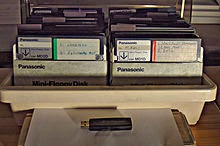
A box of about 80 floppy disks together with one USB memory stick. The stick is capable of holding over 130 times as much data as the entire box of disks put together.

The first Microsoft.com home page, in 1994: Mark Ingalls, the first administrator of Microsoft.com, says at that time, using the slow dial-up connections of the era, this page would have taken awhile to load. “For most folks at home in that day and age, you would have been able to count to three or five before that picture showed up on your screen,” he says.

Tuesday, April 15, 2014

The story behind the most iconic wallpaper ever..and Ctrl-Alt-Delete

I ran across this story about the iconic desktop picture that was the default picture used in the XP operating system.  With the demise of the official support for the XP operating system I figured I would add this story-bit about the system, the picture and of course the "Ctrl-Alt-Delete" function that is a staple of everybody's experience with Microsoft products.


XP Wallpaper-Most Famous Photo Ever

The incredible story of the XP Wallpaper ‘Bliss’ image – now considered one of the most viewed photos of all time.
As the world mourns (or not) the end of the road for Windows XP—as of Tuesday, Microsoft is no longer offering support for the operating system—Microsoft Netherlands has posted this nine-minute film on its YouTube channel all about XP’s famous default wallpaper.
microsoft-bliss-hed-2014
The backstory is told by Charles O’Rear, the photographer who snapped the iconic picture, aptly titled “Bliss,” in 1996 along a California highway north of San Francisco (reports seem to differ on whether it’s Napa or Sonoma).


This was Bill Gates explaining about the "Ctrl-Alt-Delete" feature that is used on all Microsoft based operating systems.

    
“Basically because when you turn your computer on, you’re going to see some screens and eventually type your password in, you want to have something you do with the keyboard that is signalling to a very low level of the software—actually hard-coded in the hardware—that it really is bringing in the operating system you expect,” Gates said. “Instead of just a funny piece of software that puts up a screen that looks like your login screen and listens to your password and is able to do that.
“So we could have had a single button, but the guy that wanted to do the IBM keyboard design didn’t want to give us our single button, and so we programmed at a low level… it was a mistake.” 

Here is a video explaining the story a bit more from the programmer that designed the feature.  David Bradley.
I will continue to check on viable options for upgrading my XP.  I don't want to buy a new computer...Mine runs fine for what I use it for...and the money I spend on a computer, I could use to .....Buy another gun.  Something that isn't obsolete as soon as I unpack it.